
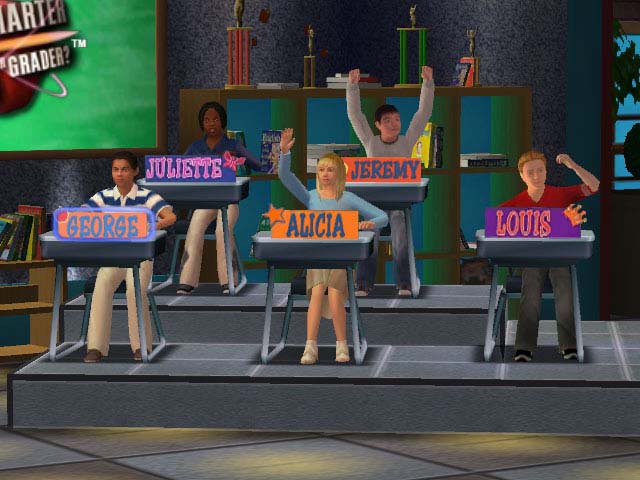
 What if class was like a game show where the teacher was the host and the students were contestants vying for the coveted prize of knowledge. That’s what learning is like for the fifth graders at PS 189 in Manhattan. Last year as part of the “Partnering with Our Digital Natives” grant, 5th grade teachers Mr. Rodriguez, Mr. Kennedy and Ms. Terribile (his collaborative team teacher) attended professional development where they received a class set of student response systems which ultimately transformed the teaching and learning in their classrooms. Today unlike most classes studying main idea, as you enter the classrooms of these teachers it’s not unusual to hear students cheering for one another as they find out the correct answer after voting with their student response systems. When questions are answered wrong, this is not seen as a mistake, but rather an opportunity to learn more about the topic they are studying. Unlike game shows however, there are no winners or losers, only learners.
 Here’s how they used the devices to transform their classrooms into a game show.
Mr. Rodriguez, Mr. Kennedy and Ms. Terribile use the materials they’ve always used in the classroom but the clickers enable them to get everyone involved. Rather than giving one student the chance to respond to a question, every student’s answer is heard, all participate, and all are held accountable.
Mr. Kennedy and Ms. Terribile’s Class
 Mr. Kennedy and Ms. Terribile gave test prep an update. Traditionally test prep consists of teachers handing tests out to students who quietly sit at their desks completing their tests and turn it back to the teacher. These are not fun times for students OR teachers. Fast forward to Mr. Kennedy and Ms. Terribile’s 21st century classroom and you see something very different. Quiet. Phew! Their kids are wooting, hollering and finding out instantly if they have a test answer correct. Mr. Kennedy and Ms. Terribile don't spend time at night grading and assessing his kids. He finds out right then and there who understands the question and who doesn’t and then guess what? They discuss the thinking that went into the right and wrong answers, really making meaning of what they did. Mr. Kennedy and Ms. Terribile instantly know if his class is ready to move on and is able to address and pinpoint issues as they occur. Because testing companies are stuck in the past and they make bigger profits using outdated paper tests, the teachers also provide students with practice on capturing their answers on paper as well while also using student response systems.
 After class Mr. Kennedy and Ms. Terribile don’t have to waste his time grading papers. Instead they move right to analyzing the data to drive his future instruction. They can create groups focusing on areas of need and provide individualized support and practice for students in need. The results and support can easily be shared with students and their parents.
Mr. Rodriguez’s Class
 Upon entering Mr Rodriguez’s class you’ll realize he teaches in a uniquely innovative way that at first outsiders can’t wrap their heads around. He truly embodies the 21st century game show host environment. You know what I mean. He talks both to his audience (students) and to the magic game show announcers and co-hosts. Think in a talk show when the host says,“Okay, Peter, tell them what they’ve won!” Or, “To help you in answering this question, we’ve brought in this expert on Gorillas. Ms. Goodall?” ...whose head magically appears in an animated box as she brings you to the Congo.
It’s fast paced. Everyone is involved and there are really cool interactive elements only available to a talk show host with a multi-million dollar budget. Right? Buzz. Wrong! Mr. Rodriguez literally embeds the use of the student response system with the interactive software from a program that his school has purchased called Compass Learning which creates curriculum and assessment solutions that motivate today’s students to engage, think & learn with fun, interactive, research-based instruction that appeals to students. Compass has already done all the work creating interactive animations that get students excited about learning. Mr. Rodriguez has set up his clickers so they correspond to the questions asked in the animations. The animated characters speak to the class. Mr. Rodriguez prompts the class to respond with their clickers, and instantly the class and Mr. Rodriguez know who understands the task at hand and who does not. Just as in Mr. Kennedy’s class, there’s as much learning when exploring the thinking behind the wrong answers and discussing how to get to the correct result as there is when discussing the correct answer.
While Compass Learning is designed as a program for individualized learning for students, using it in this way takes the experience from a solitary to a collaborative experience. While the lessons are interactive and engaging it’s much more fun for students to make meaning with their peers than it is for a student sitting alone with earbuds going through a lesson. Additionally, the connections and conversations that ensue are powerful. Mr. Rodriguez enjoys being able to assess and teach into students needs real time and he has built a culture of trust in his classroom with expectations that students will also work to teach their peers.
Mr. Rodriguez enjoys starting units with a lively whole class lesson using Compass Learning and student response systems. After that the class may go deeper in the content on their own at their own pace. Instructing this way has the side benefit of being a good option in a school that doesn’t have 1:1 access to technology. When the students don’t have access to a lab or laptop carts, they can still engage with the material and when they do have access they can explore on their own.
A suggestion Mr. Rodriguez, Mr. Kennedy and Ms. Terribile have for student response system providers and curriculum providers like Compass Learning and Teaching Matters who produces their Writing Matters curriculum is that they create assessments using student response systems. This would enable teachers to spend more time working with their students. The nice thing though is, once the lessons are created with Clicker software they can be shared, used for other classes, and recycled for the next year.
If given the choice of going to class or playing games we know what the typical student would answer. With student response systems, students and teachers get the best of both worlds with a tool that can transform any class into a game show while helping students to think, discuss, and make meaning of their learning.
Note: If you’re in a school without student response systems, you can still transform your classroom into a game show without having to purchase the costly devices using computers cell phones, and/or iPod Touches along with Poll Everywhere which provides educators with the ability to capture student responses for free.
You have read this article clickers /
promethean /
promising practices /
student response systems
with the title promethean. You can bookmark this page URL https://benncam.blogspot.com/2010/12/transform-your-classroom-into-game-show.html. Thanks!


