Henrico County Schools System has adopted the TPACK as the Framework for professional development and 21st Century Learning in the Henrico County Schools System. Henrico County is one of the largest and earliest districts to pioneer and implement a one-to-one initiative. They have adopted this model as its conceptual framework to guide their progress towards the 21st Century Learning. The following video will set the stage to provide insight into how this school district uses technology for relevant and real-world learning.
Below are some essential pieces toward meeting their vision.
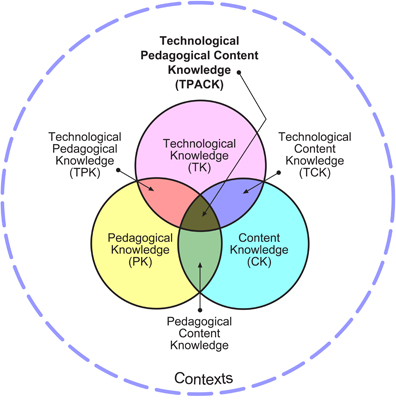
The TPACK Model The TPACK Model was created in response to the need to provide a framework around the important pieces of innovating learning with a focus on Technology, Pedagogy, and Content Knowledge. The overlap of these three components is where the 21st Century classroom is most powerful. Here is general information on TPACK and The general framework of TPACK for Henrico's 21st Century Learning.
This is a diagram of the model.
Assessment Tools
21st Century Skills - Student and Teacher Assessment This is a fantastic rubric created by the Henrico County School district that students and teachers can use to assess themselves and have a conversation with coaches, advisers, etc on where they are, where they want to be and how to get there. Interestingly findings generally indicate that students and teachers are not at the same level.
Observation Tool for Assessing TPACK evidence These instruments have been developed to help researchers and teacher educators to assess evidence of teachers' knowledge for technology integration, or TPACK (technology, pedagogy, and content knowledge). All of the instruments available at the site have been tested for multiple types of reliability and validity, and have proven to be robust tools.
Reflective Friends Henrico County Schools also uses something called The Reflective Friends which is a process designed to provide participating schools with objective data on their efforts to build 21st century learning environments. Through a series of systematic classroom observations and interviews with teachers and students, a profile of trends in classroom instruction (content, pedagogy, and technology) will emerge. These data become good information to be used for future development of your school program. Here is a Reflective Friends Sample Report.
Technology Infused Lessons The teachers write lessons incorporating the elements of the TPACK model. These lessons are vetted and posted on their professional development space. What is great about these lessons is there is a community that can comment on the lessons and rate them. They use the Wordpress platform to host the lessons. What I would add to this, (which may exist or be in the works, but I couldn’t find it) is a way to sort the lessons by topic and technology used as is done with this bank of lesson ideas to innovate learning. There are tags, so I imagine this will become available. I’d also recommend they add technology used and/or software used. This way people using the same tech or software can connect. An obstacle they had in ensuring the lessons were vetted was the amount of manpower and funding it took to do so. If you don’t have funding or manpower where you work, you may decide to let teachers self publish and viewers can take a look at the material and incorporate what they like and leave behind what they don’t like.
Henrico County is using some valuable tools and provides helpful insights for other schools and districts moving toward providing students with 21st century learning experiences.
To view the webinar visit this link. Thanks to Henrico County School District Tech Director Tom Woodward for sharing the innovative work of his district. Tom Woodward blogs at http://bionicteaching.com and can be reached via Twitter at @twoodwar
You have read this article assessing innovation /
assessment /
promising practices /
school planning
with the title school planning. You can bookmark this page URL https://benncam.blogspot.com/2011/03/using-tpack-as-framework-for-tech-pd.html. Thanks!
You have read this article school planning /
technology planning
with the title school planning. You can bookmark this page URL https://benncam.blogspot.com/2010/08/ten-helpful-reads-when-planning-for.html. Thanks!
It takes more than ensuring educators and students have access to technology when schools begin the work of developing a 21st century strategic school plan. As innovative educators, students, leaders, and families, are well aware, technology is just a tool. In and of itself technology does not equate to either innovation or greater effectiveness. In fact poorly used technology generally results in substandard instruction. In some cases this further results in dropping technology-(rather than learner) driven programs and support. This is important to remember when developing a strategic school learning plan. What's most important is learning always come first.
I've heard one too many educational leader, teacher or parent proudly state that they are part of an innovative school as evidenced by the fact that they have laptops or Smartboards in every classroom. That is not impressive. What is impressive is when the conversation begins with how student learning is enriched in new ways and learners are engaged with innovative tools and ideas. I was recently asked by a school leader for feedback on how to ensure their school's strategic planning could help ensure educators were preparing 21st century learners for success. Here is what I shared.
The goals, dreams, and vision for learners, not technology, need to drive the plan. Technology can help meet these desired outcomes but tech in and of itself is should not be the defining factor. For example a school goal could be formatted like this:
School goal for learners:
Specific technology used:
How will this accomplish the goal in ways not previously possible:
How will this enrich student learning:
Here are some ideas on how your school can get started on the road to developing a strategic plan for learning. DEVELOPING A STRATEGIC PLAN FOR LEARNING
Develop a school strategic innovation team Ideally this team is comprised of teachers, school leaders, students, and family.
Take a simple assessmentHave team members come together to take a simple assessment to see where the school lies on the continuum of 21st century success. This measures a schools success in five dimensions.
Infrastructure: Hardware, Software, Networks and Tech Support
Human Capital − Teacher Effectiveness
Curriculum Coherence, Learner Centered Instruction and Digital Content
Start the conversationDoing this enables team members to start a dialogue, develop, common language., and begin thinking about areas in which they want to grow.
Select a dimension of 21st century success on which to focusAfter taking the simple assessment, discuss and select a the dimension(s) on which it makes sense for the school to focus
Determine where you are and want to go Once the dimensions are selected the team should determine the specific areas of focus using the Rubric for School Innovation to determine where the school currently stands and strategically make a plan for moving to the next level in the continuum.
Fine-tune your focusOnce the dimensions of focus and plan are discussed the team can work to create an innovation roadmap. You can see samples here by clicking on any model school and looking at their roadmap. This will be the school's guide for moving along the continuum of 21st century success. There should be a lead writer assigned to drafting the roadmap, but all innovation team members should be invited to the document (Google docs works well) as it may make sense to have certain team members take the lead on various parts of the roadmap.
Ensure innovation road map has an educator and student-driven hardware purchase planYour school has a hardware budget. That doesn't mean that those not in specific classrooms should determine hardware purchases. Educators and students don't like to feel imposed upon. Instead, excite teachers and learners by inviting vendors to share various possibilities with classrooms and encouraging teachers to write hardware proposals with input from students. Let teachers and students partner to use the technologies. The educator as the pedagogical expert and the students could server as a partner in using the technology effectively. In my district we did this by selecting ten commonly use technology tools and invited vendors to join us. Each teacher wrote a proposal for $1500 worth of equipment (this is dependent on school budget). This results in teacher and student buy in and a partnership with leaders, educators, and students to make decisions on instruction aligned to school goals. Upon receipt of the hardware and implementation of teaching and learning, classes publish their work sharing lessons, videos, photos, and student testimonials. We have begun this work in a newly launched (and soon to be populated) site http://InnovateMyClass.org. School interested in using this tool can contact me.
Review and finalize innovation road map with innovation team When the innovation roadmap seems complete the innovation team should review the document together and revise/update. When the document seems in good shape it should be shared with the school staff for their final input.
Share road map with staff, students, and familyShare the innovation road map with the school community and incorporate feedback.
Celebrate success with innovation field trips Celebrate and learn from/about the work your school is doing with an innovation field trip. Read the School Innovation Field Trip Quick Guide to learn how.
Developing an effective strategic plan means schools focus on student success and keeping their eye on the prize. Technology is the tool to achieve the prize, not the prize itself. As the saying goes, "It's all about the kids," and with them as the starting point schools can begin effective planning.
You have read this article school planning
with the title school planning. You can bookmark this page URL https://benncam.blogspot.com/2010/03/incorporating-innovation-into-strategic.html. Thanks!
The most transformative recent game-changer in bringing education into the 21st century is low-cost laptops. Many schools at the NYC DOE and beyond still don’t know much about these devices and have trepidations. Innovative educators know that these devices are the key for any classroom interested in preparing students for the world in which they live, play, and work. Chris Lehmann echoes the sentiments shared by me and others like CIS 339 principal Jason Levy as he shared at a recent Tech Forum conference that "Technology needs to be like oxygen. Ubiquitous, necessary and invisible." Low-cost laptops, for the first time make it possible for this idea to be a reality. Every school needs to get on board TODAY. Schools all around the nation have jumped on the bandwagon and are featured in the most recent issue of Tech & Learning magazine in the article Netbooks make the grade which features schools across the nation who are using these devices.
Unfortunately some schools still believe the myths and lies shared by the hardware companies and industry dinosaurs who will tell you that you need expensive equipment, training and tech support to do this work. Let me dispel some of these myths. The big computer companies are lying. Of course they want you to buy their expensive devices. You don’t need to. The dinosaurs in the industry who want to sit you on their knee and tell you about how they walked to work every day in the snow up hill both ways, are dying to hang on to the idea that their jobs are still necessary. They don't want the secret out and they don't want to change. I spoke to one yesterday in fact. He shared how schools will never keep up with innovation because they must do system-wide refreshes of devices and nothing in life is free. Oh really? Google is free. Google Apps are free. Wikispaces are free. Ning for education is free. YouTube is free. Google Voice is free. Schools can develop student iSquads and enable students to be self-empowered to fix technology for free. Well, he said, “That free stuff won’t last I tell ya.” “I’ve been around a long time. I know Missy.” Ugh! Innovative educators are smart enough to move on when we encounter the old timers stuck in Rip Van Winkle's past. These free tools will be around and they are scaring the pants off of the old timers. Businesses like Microsoft, Apple, and the rest are going to have to change their model to the new direction of a savvy and innovative society.
WHERE DO YOU START? WHAT DO YOU NEED? Do Not Give Teachers Hardware Every school needs to identify which teachers are interested in preparing students for the 21st century. If you’re a leader, when you discover who these teachers are, do not give them hardware!!! I’ve had a lot of experience deploying hardware to teachers and in many cases it is not a good practice.
Instead, if you’re and administrator have your teachers apply for the equipment they think they will need to enhance teaching and learning. This will enable you to prioritize your purchasing decisions and limit them to the teachers who have demonstrated that they are planning to use it effectively. This also gives you crucial information in enabling you to have conversations about the work your teachers are doing. If you are a teacher, the conversation shouldn’t just be about hardware. Show your principal you are serious and have all the information together that s/he will need to support you.
You can create a free online application using Google forms or SurveyMonkey. The application should require a pedagogical case for why your teacher needs equipment, information about how the equipment will be used to enhance instruction, an indication of which standards this aligns to, and if you collect your information properly this can contain all the information needed to place the order. For teachers the application process demonstrates to his/her principal they are serious. For administrators this ensures you are aware of the teachers plan for incorporating the use of the equipment into instruction, provides school leaders with an idea of how teachers will be using the equipment purchased, and indicates which teachers are serious about this work. Here is a sample of what the form might look like. I recommend a separate form for each type of equipment.
Whether your school has funding today or not, it is essential teachers and schools start documenting what it is they want so they are prepared should funds become available and there are a lot of ways to fund education. If there is not money in your school budget here are some alternate sources. Some are NYC DOE specific, others are not:
THE 21ST CENTURTY CLASSROOM BASICS No more paper, no more books will be necessary in the 21st century classroom. When all student have devices their materials are available directly from their laptops. This also means no more handouts, no more copies, no more heavy book bags. Here is my recommendation to get started with the 21st century classroom. Brand: Lenovo
Netbook - 4187RVU S10e Ideapad, 2.65 lbs, 10.1-IN DisplayCost: $359.95 Cost for 32 devices: $11,488 Note: This particular device was selected because it is the one available where I work at the NYC DOE -available via SHOP DOE / FAMIS
Total Cost for 21st Century Classroom: $13,159 When you keep in mind these devices have a life of life of 3 – 5 years, this ultimately translates in significant long-term savings for the school.
WHAT YOU DON’T REALLY NEED – DISPELLING MYTHS OF BIG BUSINESS AND INDUSTRY DINOSUARS Many schools are sold equipment they don’t really need and they buy it because they don’t know better. Here are some items you don’t need if you have the above package.
A more expensive laptop, server, external hard drives, expensive software Today your students should be doing their work in the cloud. What does this mean? This means their work is done using what is available on the internet for free. Work is created using Google Apps which includes free Word processing, spreadsheets, presentation software, email and more. Work is stored using Wikispaces. These contain unlimited storage and are free. Students work is available anytime, anywhere, from any computer.
Interactive Whiteboards and Projector Carts Somehow teachers and administrators have become enamored with interactive whiteboards. You can save about $5000 per classroom when you realize you don’t need an interactive whiteboard or projector cart. You can accomplish the same instructional goals with a laptop and projector. The benefit is rather than having the teacher front and center in the classroom s/he can be eye to eye with students as the classwork is projected behind him/her. This can be interactive as students work is in the cloud and a teacher can access any website at anytime to feature the student, or the student can come right up to the computer and/or plug in their own computer to project. You may hear that the software is the reason you need to make this costly purchase. I have found there are free alternatives to achieve the same goals.
Laptop Carts Some schools will find they may need to purchase a cart which generally runs about $600 but I have seen other schools that have developed alternative and more secure methods for storing devices. The best solution I have seen is the Depot. This is a secure room or closet for which the teacher has a key. Shelves are built in the area. Devices go on the shelves and the door is locked. Ideally there is electricity so devices can be charged.
THE TIME IS NOW Innovative educators and administrators, it is time to start one classroom at time, one school at a time, one district at a time, one nation at a time. You don't need a special initiative. You don't need special funding. What you need is innovative rethinking the way teaching and learning occur. Join other schools like the NYC DOE's Model Technology Schools. If you don't know where to start or what to do with 21st century tools read about, connect with, and/or visit the the 8 Innovative Schools that Provide Ideas and Inspiration for 21st Century Education.
You have read this article Low-Cost Laptops /
netbooks /
notebooks /
school planning
with the title school planning. You can bookmark this page URL https://benncam.blogspot.com/2009/10/cost-effective-ways-to-prepare-your.html. Thanks!