Showing posts with label social networking. Show all posts

Last Day of Free Ning Networks - What Should You Choose?

Today is the last day of free Ning Networks. To date I’ve mostly considered other hosted options to replace Ning, however, recently I was challenged as to why I prefer a hosted platform vs self-hosted. The answer is simple. Because they’re free and easy. Of course on the other side of the issue is any platform that is free today can be gone tomorrow or charge tomorrow. Network creators affected by the Ning disaster know this first hand.

However, like a breakup with a significant other, I don’t see all other service providers through scorned eyes. I’d like to believe there are other companies like Wikispaces and Google Apps for Ed who really do believe in free for educators...and not faux free like Ning i.e. you can get for free something that isn’t really enough for most of you, but we’ll look good and so will Pearson. So I wrote this post The Innovative Educator’s Learning Network (Alternatives to Ning) Top Picks where I suggest my top picks which are hosted and this post Death of Freemiums at Ning Could Mean Better Opportunities for Schools where I also explore the Children's Online Privacy Protection Act of 1998 (COPPA) and suggest some ways we can use learning networks with pre-teens.

For most network creators, I’m still love struck enough with the “free for educators” idea and believe that we can trust sites like Grou.ps, especially when enough educators hop on board, but clearly if they go the way of Ning, I’d readjust my thinking. The other issue is the superior level of customization and integration that is available with self-hosted platforms. The downside of this is that to realize the benefits you need to 1) have a higher level of techspertise then many of us (including me have) and 2) It requires installation in your own web server or that of your web hosting provider. So while the software is free, you will still have to spend for web hosting to be able to maintain an online community site. Typical cost is between $4-$7 per month and gives you unlimited storage, bandwidth, emails, and access to simple scripts, a one button tool for installing the latest open source software for everything from project management to wikis to survey/form software and more.

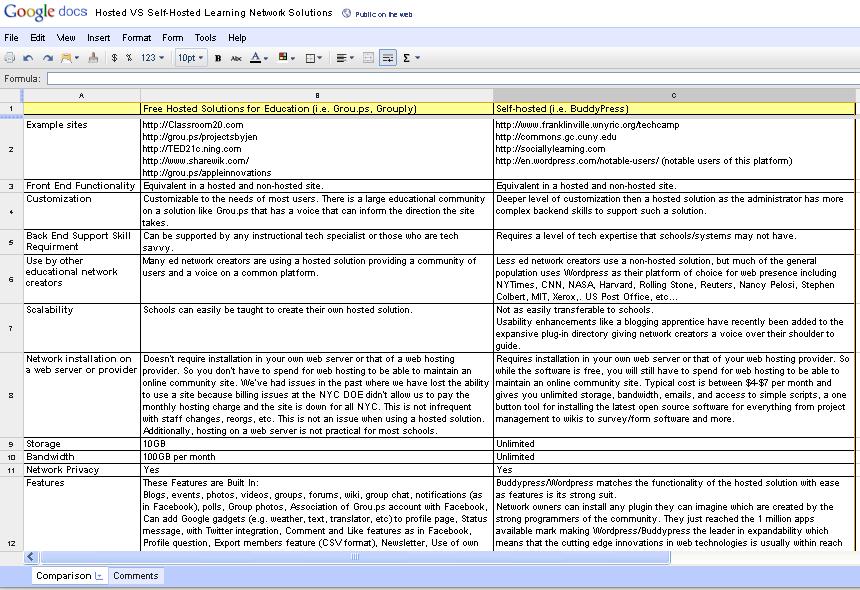
So, while I’ve dug my heals into the ground picking free and easy, I realized it was time to look more closely at the self-hosted solution, but where to start? I have no experience with a self-hosted solution so I asked the brilliant and knowledge members of my personal learning network to contribute their input in a Google doc as I recently shared in my post The PLN Matures. The Progression of the 21st Century Personal Learning Network.

Here is the result which you can see live (and even contribute to) by clicking on the chart below.


Special thanks to @funnymonkey, @don_watkins, Evan O’Donnell, Jim McDermott and all the others who you can see in the revision history of the comparison document. You can read a more detailed analysis of which solution to select over at The Techomnivore in his piece, “For your educational network, personal learnin network, or special interest social network, you’re missing an opportunity if you leap from ning to another hosted service before fully considering Buddypress.”
You have read this article Ning / Personal Learning Network / social networking / social networks in education with the title social networking. You can bookmark this page URL https://benncam.blogspot.com/2010/08/last-day-of-free-ning-networks-what.html. Thanks!

Blogs Should Promote...Not Stunt- Conversation

While I wanted to give kudos to the Digital Literacy blog for sharing my post about Why Social Media Curriculum is Critical in Schools and give a thumbs up to those below who commented...I couldn't. Instead, I give a thumbs down to blogs like this who close off the conversation to those about who they talk…and the rest of the world. Blog comments can be moderated if necessary, but telling the world that you want to talk about them, but you don't want to hear what they say makes no sense, is in poor taste, and just doesn't seem like the American way. Controlling the sharing of thoughts and ideas and not allowing other powerful voices to come in, contribute, and be shared is no good! So, while I tried to draft a response to the authors and readers of this blog, this is not possible. This blog is deaf to outsiders.

Instead I share here in an admittedly awkward platform, my only possible spot to contribute my response. If you're interested, first read my post about Why Social Media Curriculum is Critical in Schools then the responses from the members of my blog followed by my reaction.

Alison said...

This is a very interesting idea. I can see from the point of view that says that social networking sites can be beneficial in an educational environment, but I'm not sure if I would include Twitter. You can't give a full and complete answer in such a limited amount of characters. Also, I wonder if this would eliminate the human element in classrooms if students and teachers were communicating through computers.

April 24, 2010 9:56 AM http://www.blogger.com/img/icon_delete13.gif

Shannon said...

I strongly agree with incoporating technology in the classroom, but, I do not think social network sites are the way to go. There is too much potential for student misuse while working in school. I believe students can work and communicate with their friends face to face in the classroom by working in groups.

Jacki Goy said...

While I agree with both Alison and Shannon, I also think that the use of social network-type sites by students and teachers (together) could let them understand each other on a different level. For example, I am "friends" with a few of my professors at Oneonta on Facebook. Many people claim that they have inappropriate pictures and posts on sites like Facebook and Myspace, but when is something considered "inappropriate"? If students do not feel comfortable with someone seeing any kind of information about him or her on the internet, it simply should not be on the internet. I think that the way certain forms of technology are used is more important than the idea of using them at all.

April 25, 2010 1:56 PM

First, I want to thank Digital Literacy for sharing my post and I do hope to connect with your members in the future on my blog http://theinnovativeeducator.blogspot.com.

@Alison, you should include Twitter. It is one of the most powerful tools out there for learning. Twitter isn’t about a Tweet. It’s about a conversation. See this smart comic strip from my blog contributor Jeff Branzburg for insight into this concept http://theinnovativeeducator.blogspot.com/2010/04/twitter-its-all-about-conversation.html . I have learned an enormous amount from my Twitter network. There are many brilliant people on Twitter because of this. Don’t dismiss the tool and its power without investigating it fully. As far as your question about eliminating the human element-absolutely not. First…the people on Twitter are humans. It doesn’t eliminate the human element, instead it increases it and connects you to a whole global world of humans who connect, make ideas, and have conversations. When these humans have the opportunities to connect f-2-f or via telephony services, our conversations are rich and tools like Twitter allow the conversations and ideas to keep going even when we are not in the same physical space.

@Shannon, please don’t eliminate social networks because of misuse. These are the tools that allow us to connect globally with others who share our passions, talents, and ideas. If we were to ban potential tools because of misuse we’d need to tape everyone’s mouths and cover their ears and ban paper and pens. Social (or as I call them learning) networks are communication tools that allow us to share ideas, thoughts, and have conversations. Yes, the sharing of ideas can be misused, but in America, we do believe in freedom of speech. In schools we can work with students to discuss acceptable and appropriate use.

@JackiGoy, yes! Right on target. We should live the life online and offline that we are comfortable with. Whether virtual or physical what we do becomes a part of the digital or mental footprint of others and we need to think about and be deliberate in our actions. Let’s help instill the idea that the physical or mental footprint we leave behind should be one we are proud of. That surely will contribute to a responsible and respectable populous.

You have read this article social networking with the title social networking. You can bookmark this page URL https://benncam.blogspot.com/2010/04/blogs-should-promotenot-stunt.html. Thanks!

Real Time Communication in Education - 140 Character Conference Begins Today!

badge5The 140 Characters Conference in New York City begins today, April 20th. It's largest worldwide gathering of people interested in the effects of the real-time Internet on business, education, and “we” the people. Speakers include Ann Curry, NBC News (@AnnCurry), Chris Lehmann, Principal of the Science Leadership Academy, (@chrislehmann), Donny Deustch (@Donny_Deutsch), Ivanka Trump (@IvankaTrump), and MC Hammer (@MCHammer).

I am a part of the Twitter and Education panel and joined by @mbteach, and @kjarret, with @parentella moderating. The topic of our panel is called, "Real Time Communication in Education. Specifically, we'll be discussing:

1) Teaching Kids how to manage their Digital Footprint
2) Why social media curriculum is critical in schools
3) Ideas for parents interested in helping students manage their digital footprint and effectively participate in social media.

For a preview of what I'll be discussing, you can click on any of the links above for my thoughts on the topic.

I look forward to discussing these topics on the panel and I hope to see other innovative educators at the conference as well.

If you're already in NYC this is something you should consider attending tomorrow. You can register to reserve a ticket at a cost of $80 for one day. You can register here to guarantee yourself access to the event.

The format at the #140conf events is unique. Individual talks are 5 and 10 minutes, keynotes are 15 and 20 minutes and panel discussions are no more than 20 minutes. During the course of the two days more than 140 people will share the stage at the 92nd Street Y in about 70 sessions. To get a feel of the energy you may experience click here to review the videos from the 2009 #140conf NYC. The takeaways from this event will provide the attending delegates knowledge, perspectives and insights to the next wave of effects twitter and the real-time internet will have on business and education in 2010 and beyond.

You have read this article #140conf / 140 Character Conference / digital footprint / social networking / twitter with the title social networking. You can bookmark this page URL https://benncam.blogspot.com/2010/04/real-time-communication-in-education.html. Thanks!

Death of Freemiums at Ning Could Mean Better Opportunities for Schools

Students Using Social NetworksAs a proponent of using resources in school that are used in the real world, I’m often asked what my feelings are about using social networks with students, which I have written about numerous times here on my blog. There’s great educational value in using such networks, but the sticky part always comes when asked about the use of networks with students under 13. This recently came up again when Renny Fong, Innovation Specialist at a K - 5 school in New York City asked the following:

"Could we create a "safe" place where our students could have a private/intranet kind of social network. Is there anything out there that is for 10-year-olds or even younger, where you don't need an e-mail address and the activity could be monitored by the school? Is this even a good idea? We even have a handful of first and second graders who have come to the computer lab asking if they can go on Facebook!

What to do?

Any advice would be greatly appreciated! I have a feeling you've probably even written about this, so if you could forward me along any information. I think we need to address this as a school, amongst teachers, students, and of course, parents."

The question is not as easy to answer as one might think because many of us in the ed tech world are under the impression that the COPA (or is it COPPA?) law says you can’t use online networks with students. Many of us believe this because places like Ning and Facebook require users to be 13. However, after posing this question to my own learning networks in Twitter, Facebook, Classroom 2.0, one of my friends indicated my belief was incorrect, so I studied the law a little more closely and was surprised to find the following about the law.

First, there are two different Acts. Yes, two!

Child Online Protection Act and Children's Online Privacy Protection Act. And, therein lies part of the confusion.

To shed a little light on this, here is a recap of each bill (Wikipedia, April 16, 2010).

Child Online Protection Act

The Child Online Protection Act[1] (COPA)[2] was a law in the United States of America, passed in 1998 with the declared purpose of restricting access by minors to any material defined as harmful to such minors on the Internet. The United States federal courts have ruled that the law violates the constitutional protection of free speech, and therefore have blocked it from taking effect. As of 2009, the law remains unconstitutional and unenforced.

COPA required all commercial distributors of "material harmful to minors" to restrict their sites from access by minors. "Material harmful to minors" was defined as material that by "contemporary community standards" was judged to appeal to the "prurient interest" and that showed sexual acts or nudity (including female breasts).

On March 22, 2007, U.S. District Judge Lowell A. Reed, Jr. struck down the bill,[7] issuing an order permanently enjoining the government from enforcing COPA, commenting that "perhaps we do the minors of this country harm if First Amendment protections, which they will with age inherit fully, are chipped away in the name of their protection."[9] The government again appealed, and the case was heard before the Third Circuit.[10]

Ultimately, on January 21, 2009, the United States Supreme Court refused to hear appeals of the lower court decision, effectively killing the bill.[13][14]

Children's Online Privacy Protection Act

The Children's Online Privacy Protection Act of 1998 (COPPA) is a United States federal law, enacted October 21, 1998. The act applies to the online collection of personal information by persons or entities under U.S. jurisdiction from children under 13 years of age. It details what a website operator must include in a privacy policy, when and how to seek verifiable consent from a parent or guardian, and what responsibilities an operator has to protect children's privacy and safety online including restrictions on the marketing to those under 13. While children under 13 can legally give out personal information with their parents' permission, many websites altogether disallow underage children from using their services due to the amount of paperwork involved.

The Act applies to websites and online services operated for commercial purposes that are either directed to children under 13 or have actual knowledge that children under 13 are providing information online. Most recognized non-profit organizations are exempt from most of the requirements of COPPA.[1]

The application of the Act to photographs of children is a matter of interpretation that is yet to be tested in the courts. However, one US government department says "There is no restriction on the dissemination of photos of children, if they are taken in public spaces, with no identification, and are used only for editorial (not advertising) purposes. The use of pre-arranged photos, taken in a protected environment such as a school or hospital, and showing a highly-defined and recognizable image, requires a release".[3]

So what's that all mean?

I did my best above to share the relevant parts of each Act. Here's my my educator's interpretation. I am not a lawyer however, so for a legal interpretation, you may need to find one of those.

The COPA bill was never passed because it was believed to violate free speech. I think that Judge Reed's insight in regards to the COPA bill is important. It goes in alignment with my belief about filtering which is that we should be preparing students inside schools for the world they live in outside of schools.

The COPPA bill was bill was passed into a law, however, the belief many educators have about the illegality of students engaging in online networks is incorrect. I was one of those educators who believed that it was illegal because Facebook and Ning had policies against children under 13 using their networks and I have read that decision was made as a result of the COPPA law. After review of this law, I have concluded that they do this because it's easier to just disallow students from using the site then it is to complete the paperwork involved. Also, it should be noted that the act applies only to services that are operated for commercial purposes.

So what now?

Since I'm proponent of using social (or as I say, "learning") networks with students, I'm often asked by those like Renny, what to use for schools who want to do social networking with elementary students. There are a bunch of paid for sites exist, but I believe these services should be free for teachers, just like Ning is for students over 13. Many companies have jumped on the band wagon for paid for sites for students, i.e. Saywire, SchoolTown, eChalk, ePals. But I believe that there should be companies who bother to figure out the paperwork for students under 13 and offer a free alternative to students. And, the timing for this is great. As many innovative educators have recently learned, there is a big brouhaha happening with Ning as recently reported in Tech Crunch here Ning's Bubble Bursts: No More Free Networks, Cuts 40% Of Staff and then by the New York Times Ning Kills Free Service, Would Like to Get Paid Now, Please.

Now all sorts of companies are popping their heads out excited and ready to take their piece of the market. Companies like http://wackwall.com are proudly displaying their willingness to take the share of the market. There are two things to notice on the WackWall homepage image:
1) They are primed to take Ning's market. In fact their blog says that they will soon release a migration tool.
2) They have a young child on the homepage. So, maybe they are willing to accept under-13 users. I didn't find anything to the contrary on their site.

There are many sites to check out though.
In fact, it was amazing to watch the speed at which the alternatives to Ning document has developed http://is.gd/bup2u. As I visited this document today there were more than 350 other viewers looking on as well. Instantly there's a list of possibilities for educators to explore, and now that Ning has crashed down and opened up the market, we'll see what plays out. Will this become a paid for only environment, or will freemiums prevail???

And, then what?

If you plan to use a learning network with kids under 13, tech facilitator Kevin Jarrett and library media specialist Susan Ettenheim have good advice. Kevin shares that at their school, they, "have everything covered re: COPPA/CIPA/whatever ... we use no personally-identifiable info ANYWHERE, parents sign a permission form, and I (Kevin) create the accounts and have the passwords. So, we (the school) have control." Susan Ettenheim explains ides for how you could have a site with no personally identifiable information in her blog post, Creating Avatars and Icons as personal representations - as opposed to photos. For the under 13-sect, this is a great option. For over-13, I recommend we start helping students establish an appropriate digital footprint that represents an identity of which they are proud. You can read more about how to do that here.
You have read this article COPA / COPPA / Ning / social networking / Social Networks with the title social networking. You can bookmark this page URL https://benncam.blogspot.com/2010/04/death-of-freemiums-at-ning-could-mean.html. Thanks!

Help students manage their digital footprint and effectively participate in social media - 140 Character Conference

badge5I am presenting at The 140 Characters Conference in New York City on April 20th. This event is the largest worldwide gathering of people interested in the effects of the real-time Internet on business, education, and “we” the people. Some of the other speakers include Ann Curry, NBC News (@AnnCurry), Chris Lehmann, Principal of the Science Leadership Academy, (@chrislehmann), Donny Deustch (@Donny_Deutsch), Ivanka Trump (@IvankaTrump), and MC Hammer (@MCHammer).

I will be a part of the Twitter and Education panel and joined by @mbteach, and @kjarret, with @parentella moderating. Specifically I'll be discussing:

1) Teaching Kids how to manage their Digital Footprint
2) Why social media curriculum is critical in schools
3) Ideas for parents interested in helping students manage their digital footprint and effectively participate in social media.

In anticipation of the conference I'm writing about each topic. You can read what I wrote about Teaching Kids to Manage their Digital Footprint here and Why social media curriculum is critical in schools here. For this post I am addressing:

Ideas for parents interested in helping students manage their digital footprint and effectively participate in social media.

As children enter their teenage years they begin participating more and more in online environments and parents are often at a loss for guidelines around how to offer their children support and guidance. In many cases parents may ask their teachers for advice on how to help their children engage effectively in online environments. Here are three simple ideas teachers can share with parents interested in helping students manage their digital footprint and effectively participate in social media.

  1. Help teens take control of their digital footprint
  2. Help teens determine what their digital footprint says about them

  3. Connect with others with your passions and interests
1) Have a conversation with teens about taking control of their digital footprint
I was recently at a conference where educators were discussing whether or not teenagers should use their real names online. One of the women in attendance felt strongly that in their teenage years students should begin using their real names. She posed the question, "If we don't take ownership of our digital identity who will?" This is a powerful question and brings to light the concept of active and passive digital footprints.

A 2006 Pew Internet report indicates there are two main classifications for digital footprints: passive and active. A passive digital footprint is created when data is collected about an action without any client activation, whereas active digital footprints are created when personal data is released deliberately by a user for the purpose of sharing information about oneself.

The question becomes, this. Do you want to deliberately be aware of and control what you stand for online or do you want that to be left to others? Parents who agree the teenage years are the right time for students to begin identifying what they stand for and who they are can begin helping their children establish a purposeful digital footprint. Teaching students the lesson of responsibility and accountability early on can result in a future payoff of giving them a name they can proudly stand behind. If we teach a student to automatically think about what their online behavior and words say about what they represent and remind them that their words leave a digital footprint, how might this change how they interact?

It can be very powerful for students to begin developing their identity at this stage of their life and extremely impactful if parents guide and support their children in doing this. But who are your children? What is the message they want their digital footprint to convey? How do they know what it is or should be? How could they find out? The answer to that is in the second idea.

2) Help teens determine what their digital footprint says about them today

Of course the most obvious way to uncover your digital footprint is by Googling yourself. When you do so, what comes up? Once you explore that, decide, is that what I want people to see when they Google me? If it is, terrific. You/your teen is doing a great job. If it's not, think about what it is you want to have appear when someone Googles you. What do you stand for? I asked myself this question two years ago when I started my blog. I decided that I wanted to be the number one topic that came up whenever someone searched for "educating innovatively." To make that happen I began considering and implementing Ideas for Making a Purposeful and Professional Digital Footprint. Now, two years later, I dominate the page for that search term. Work with your child to think about what their defining phrase, statement or idea may be.

Here are some innovative and not-so-obvious ideas for parents exploring the digital footprint of teens who use Twitter or Facebook. Parents and their teens can start exploring their digital footprint with what I call "Recap Apps." Recap apps let you take a look at who you are online in a variety of ways using your words, photos, and updates over a period of time you specify (i.e. the last month, three months, six months, or year). The apps are free and it only takes minute or so to generate each one.

A parent and teen can do this together and discuss what the word clouds, status clouds, or photos say about them. Parents should ask their teen how they feel about this digital footprint. Here are some ideas for questions they may discuss.
  • What do they like?
  • Is there anything they are proud of?
  • Is there anything they are embarrassed about?
  • What might they want to change?
  • What might they do to more effectively represent how they want to be viewed by others?

You can find out more more about how to use recap apps in these posts.


3) Connect with others with whom you share passions and interests

Once you help your teen to discover what their digital footprint says about them and they decide they want to take control of it, they'll need to do some thinking about what it is they really stand for. They'll want to explore their interests. In fact, some, like Sir Ken Robinson, would say that perhaps the most important job of a parent or teacher is to support children in discovering these talents, interests, and passions. The internet provides opportunities to do this and connect with others ways never before available.

Watch your child when s/he uses the internet. As Sir Ken suggests, "Kids give you messages." Our job is to watch, guide and listen. He shares that you may be surprised what it is your child loves. "When Olympian Bart Conner's mother noticed he walked on his hands as well as his feet, she noticed, "Hey, he's a gymnast!" "Some are drawn to drawing, some are making music all the time, some love moving around. You have to see and hear the message your child is sharing and encourage it because when you find your talent your whole life changes." Finding your talent gives students, "purpose, meaning and fulfillment" and what more could a student hope for from their parents and teachers.

While it is certainly important to be aware of how your child's passions, interests, and talents may manifest themselves in the real world, the online world is also important connecting individuals to people and places, never before possible. Remember too that anytime your child engages online they are creating a piece of their digital footprint. Whether it is a tweet they send out on Twitter, a status update they write on Facebook, a comment they leave on a blog, or a conversation they engage in on a discussion board, these all contribute to who your child is online. As a parent you can serve a crucial role in your teen's life, by helping him/her engage responsibly and effectively with others who share your child's passions and interests. Not only will this help him/her on the road to developing an active digital footprint, but you are also helping your son or daughter develop an important life skill.

To illustrate this point I am sharing the story of a student that attends The Island School about which I wrote You Can Get a Dalton Education at a NYC Public School. This is a school that lives and dies by the belief that the most important part of their work is to help students find and develop their passions, interests, and talents. I had the pleasure of visiting the school and speaking with students and teachers. Every student who attends this elementary/middle school is told that this is a place they will be exposed to, find and develop their passions and talents. Some shared that when they started school they were nervous because they didn't think they had any talent or passion. By the end of their first year at the school every student knows they've got talent, interests, and passions.

There were so many wonderful students at this inner city public school on the lower east side of Manhattan, but one that particularly stood out was a young man who just loves buses. Yes, buses. The things that take people around New York City. With the help of his parents and teachers this student began a physical and virtual exploration and development of his passion. First any time he road a bus, he studied it. Is this really the most effective layout of seats? Could the onramp for those with disabilities be designed better? What about the fuel emissions? Could there be a way that buses ran cleaner? He also visited the MTA and museum and spoke to experts there and, of course he spoke with bus drivers, but some of his strongest connections were those he made online.

This student began reading blogs about buses. Yes there are many. He began commenting on these blogs. He started interacting with others on MTA discussion boards. He could read newspaper and magazine articles and comment on those with authors and experts on the topic. He knew how to find the latest news about buses by using search terms on Twitter, and he could follow those with relevant Tweets. And, he could Tweet too! Before you knew it, this student had begun developing not only a strong personal learning network, but he was also laying the groundwork for a purposeful digital footprint. An interesting thing about this is that expertise has no age barriers and this students thoughts, comments, and ideas sat right beside others in the field and he was quickly establishing himself as an expert on the topic, even though he was only in middle school. This student had big ideas, big plans, and a respectable digital footprint. His principal shared that from her school he went on to Automotive High School and she expected he would soon move on to an engineering college to pursue his passion of bus design and engineering.

Parents who can work with their children and teachers to discover, uncover, and develop their students passions and interests using both traditional and digital tools, will provide students with some of life's most valuable and memorable lessons.


I very much look forward to discussing this on the Twitter and Education panel and I hope to see other innovative educators at the conference as well. If you are thinking about attending #140conf NYC you can register to reserve a ticket at a cost of $140 for the two day event or $80 for one day. You can register here to guarantee youself access to the event. The format at the #140conf events is unique. Individual talks are 5 and 10 minutes, keynotes are 15 and 20 minutes and panel discussions are no more than 20 minutes. During the course of the two days more than 140 people will share the stage at the 92nd Street Y in about 70 sessions. To get a feel of the energy you may experience click here to review the videos from the 2009 #140conf NYC. The take aways from this event will provide the attending delegates knowledge, perspectives and insights to the next wave of effects twitter and the real-time internet will have on business and education in 2010 and beyond.
You have read this article #140conf / 140 Character Conference / digital footprint / social networking / twitter with the title social networking. You can bookmark this page URL https://benncam.blogspot.com/2010/04/help-students-manage-their-digital.html. Thanks!

Wiki Established to Explore Use of Educational Networking

By Dana Lawit

One of the most liberating characteristics of the Internet and Web 2.0 technology -- the ability for an infinite number of individuals, communities, and networks to broadcast and exchange ideas instantly -- is also perhaps the most maddening.

What the web lacks, for better or for worse, is an editor.* And while I consider myself a savvy Googler (made more savvy thanks to The Innovative Educator's recent post spotlighting Google Search education), sometimes I don't want to search. Instead, I'd like to browse and wander around a world of ideas the way I'm able to do on those lucky Sunday mornings with the New York Times.

All of this is say that I really appreciate a good editor, or perhaps a more aptly stated would be that of curator. That's why I'm excited that Steve Hargadon has established a wiki to explore the uses of Educational Networks (social networks devoted to education). The site even includes a listing of current educational networks. It's nice to have a place to start my web wanderings that is vetted by a reputable curator.

Who are your favorite web curators? Where do you go for the digest? Suggestions welcomed.

---------------------------------------------------------
*I don't want to imply that I think that web content should be filtered or edited by one individual, or organization. Wikipedia's model of an active editing community is an incredible example of group think. What's missing from so many blogs is an exchange between writer and editor.
You have read this article online social network / social networking / Social Networks / social networks in education with the title social networking. You can bookmark this page URL https://benncam.blogspot.com/2009/08/wiki-established-to-explore-use-of.html. Thanks!

Five Innovative Ideas for Celebrating Women’s History

March is a time when many school teachers celebrate women’s history. If you are among those who are taking some time to recognize accomplishments of women, here are some ideas that innovative educators can use to enhance teaching and learning around this topic.

Xtranormal

Have students research and select an historic woman they admire and make their own movies starring this woman in various possible settings such as 1) A meeting with President Obama 2) A discussion with classmates 3) A meeting with your school principal 4) A topic of your choosing.

Xtranormal’s mission is to bring movie-making to the people. Everyone watches movies and they believe everyone can make movies. Their revolutionary approach to movie-making builds on an almost universally held skill—typing. If your students can type something, they can turn it into a movie.


Remix America

Since the Seneca Falls Convention in 1848, women have demanded their voices be heard in the social and political arenas. In celebration of Women’s History Month, Remix America will temporarily suspend the “This Day in History” featured video to highlight seminal moments in Women’s History. How better to celebrate these women than to provide students with original source material to study and discuss? Every day in March, visit the site for a new clip highlighting the speeches and essays of these rebels, these visionaries, these pioneering feminists.

Students can interact with all of these videos by using the online, free video editing tool to cut and remix these clips into Women’s History montages. Innovative educators can also visit the Remix America Blog to find featured content and commentary about why these source materials are important and relevant to today.


SMARTBoards

Interactive whiteboards are powerful tools to engage visual and auditory learners and accomplish the first rule of teaching - "First get their attention and then keep them engaged." To help to help celebrate Women’s History Month Tequiment has put together a collection of lessons, websites and a new question set for a Jeopardy-style Quiz Game. You can view these resources by visiting their blog where you will find the following resources: Women's Rights Quiz Set, Women's History - Colonial Women, Women of the Civil Rights Movements, Women's Suffrage of the 19th and 20th Centuries, Los Animales de la Granja.


Create a Social Network

Capitalize on your student's interest in social networking sites like MySpace and Facebook and Create a Social Network learning environment for your students. Innovative educators are coming up with all sorts of creative ideas to use social networks to engage students. How about creating a network with women historical characters? Students can take on the persona of a historical woman they admire, create their personal page for that character with questions you and your students agree upon, engage in discussions, join groups that character would be involved in engage in chats as the woman they have selected, upload videos (which can be rated and commented on), and publish blog posts. One of the most popular social network creation tools, Ning is allowing educators to create free educational social networks. For more ideas about using social networks in education visit Ning in Education. If you've never participated in a social network I invite you to get the experience of participating by joining The Innovative Educator Social Network. This will enable you to have a better idea of how you can incorporate a social network into your teaching and about the value of Social Networking for Innovative Educators.


Note: In some school districts Ning is blocked. Create your social network remotely and work with your administrator or technology specialist to unblock the site you have created in advance.


Voki

Have students select and research a woman they know that they admire and create a Voki that either shares, 1) how she has contributed positively to women in her life 2) why it is important to recognize women’s accomplishments 3) a topic of your choosing.

Voki enables students to express themselves on the web using a talking character.


Students can customize their Voki to look like and/or take on the identity of lots of other types of human and nonhuman characters. Vokis can speak with the student’s own voice which is added via microphone, upload, or phone. Students can also choose to insert text and have the Voki use a variety of existing voices with more than a dozen different male and female accents to choose from.


Once the student Voki’s are created they can be inserted into a class blog, wiki, website, and more. From there the school community can comment on and discuss one another’s work and keep the conversation going.


These are just some ideas to inspire innovative educators in their upcoming work with students in recognizing women’s contributions. I invite readers to share your thoughts, feedback, or experience implementing one these ideas or one of your own.


You have read this article arts in education / education / Ning / SMARTBoards / social networking / Social Networks / technology / Voki / Women’s History / women's history month / Xtranormal with the title social networking. You can bookmark this page URL https://benncam.blogspot.com/2009/02/five-innovative-ideas-for-celebrating.html. Thanks!

Facebook for Parents


Facebook for parents (and educators) is a favorite discussion topic of mine. A Facebook friend recently shared with me a website devoted to just this topic. It is called, you guessed it...Facebook for Parents. The website presents classes, talks, seminars, and newsletters, though it is not clear from the site if there is a fee. There is a huge demand for this type of resource throughout school systems, so while this one is located in Stamford, I imagine/encourage others to pop up around the globe.

The homepage of the site has a useful article called Five Steps for Parents on Facebook which details the following:
  1. Join Facebook
  2. Friend your kids
  3. Review your kids' profile pages
  4. Review who is friends with your kids
  5. Select "More About" for your kids
These are good tips to get started. This may be a good resource for innovative educators to share with parents. If anyone has used it, please share your feedback.

--------------------
The New York Times covered this at Facebook for Parents.
You have read this article facebook / facebook for parents / Facebook in education / social networking with the title social networking. You can bookmark this page URL https://benncam.blogspot.com/2009/02/facebook-for-parents.html. Thanks!